Credits and trade
The Exchange: Nullbelt's Player Order Book Explained
How the Nullbelt Exchange works: limit and market orders, escrow, the taker fee, price-time priority, the station stall and a worked bid example.
On this page
- How Exchange orders work: limit vs market
- Escrow: what an order holds
- The taker fee
- Price-time priority: who fills first
- The station stall: a small liquidity floor
- How reference prices form
- Where your goods go: hold or locker
- Market → Orders: your history, fills and cancels
- Worked example: placing a bid and getting filled
- When you die with orders open
- Frequently asked questions
The Exchange is the market in Nullbelt: one order book per station and commodity, where pilots buy and sell at prices they choose. If you list ore at ₡14 and another pilot wants ore at ₡14, the trade fills. Nothing on the Exchange is random. Prices are always whole credits, and quantities are always whole units. Every station trades all six commodities.
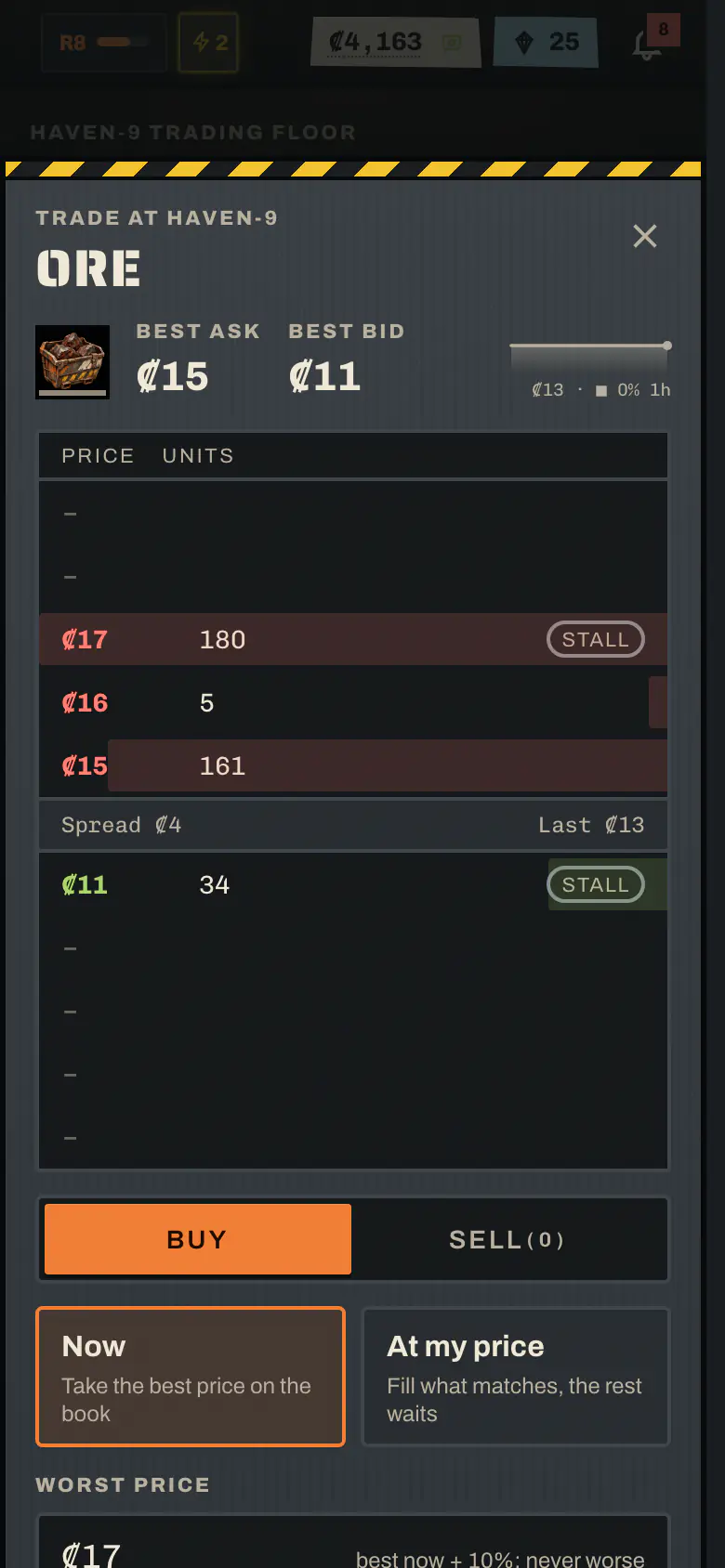
You'll find it under Market → Trade. Each commodity has a card showing the last price, the change over the last hour, a sparkline and the best bid and ask. Tap a card to open the trade sheet, which has the order book ladder, Buy and Sell, and a choice between Now and At my price. You can read every station's book from anywhere, but you can only trade where you're docked.
How Exchange orders work: limit vs market#
There are two kinds of order:
| Order | In the game | What it does |
|---|---|---|
| Limit order | "At my price" | You pick a side, a whole-credit price and a quantity. Whatever can fill now fills. The rest rests on the book until it fills, you cancel it, or it expires. |
| Market order | "Now" | Fills up to your quantity right away, never at a price worse than your worst price. It never rests: anything that can't fill is simply not bought or sold. If nothing at all can fill, the order is refused. |
The default worst price for a market order is the best price now ± 10%. You'll never pay more than that by surprise, even if the book moves while you tap.
Order limits:
- At most 10 open orders per pilot, across all stations. An order that fills completely right away doesn't count.
- At most 500 units in one order.
- A limit order expires after 48 hours.
- A limit price must sit between 0.25× and 4× the station's reference price, and never above ₡100,000. The trade sheet shows the allowed range. The band stops anyone using absurd prices to move money between accounts.
- You must be docked at the station: not in transit and not in the brig.
Note
You can't trade with yourself. If your own resting order would be in the way of a new order, the game refuses the new one and tells you the price of the order that's blocking it.
Escrow: what an order holds#
When you place an order, the Exchange takes what you're offering up front:
- A sell order takes the goods out of your hold at once, which frees the cargo space.
- A buy order holds price × resting units in credits from your credits on hand.
Since a resting order never pays a fee, no fee is held in escrow. If you cancel an order or it expires, the escrow comes back: credits go to your credits on hand. Goods go to your hold if you're docked at that station and have room, or to your storage locker there if not.
The taker fee#
Only the taker pays a fee. The taker is the order that crossed the book and filled right away. The fee is 2% of the value that filled, rounded half up to a whole credit, so a very small trade can pay no fee at all. It's added on top of a buy and taken off a sale.
The maker, whose order was resting, pays nothing. That's the reward for providing liquidity: post a limit order and wait, and you trade fee-free.
Part of every fee goes to the station's Market Hall concession. The rest is burned and leaves the game.
Tip
If you aren't in a hurry, rest a limit order a little inside the spread instead of buying "now". You skip the taker fee, and players inside the stall's spread always fill first.
Price-time priority: who fills first#
The Exchange matches orders by price-time priority:
- An incoming buy fills against the cheapest asks first. An incoming sell fills against the highest bids first.
- At the same price, the oldest order fills first.
- Every fill happens at the resting order's price, not the incoming one's.
Partial fills are normal. A sell of 20 units might fill 8 against one bid and 12 against the next. Whatever is left of a limit order stays on the book.
The station stall: a small liquidity floor#
Each station runs its own stall, the only trader on the Exchange that isn't a player. It's a small, predictable floor, so a quiet station can still trade:
- It quotes around a centre price, which is the reference price shifted by the station's character for that commodity (see Commodities). Its ask is the centre plus 15%, rounded up. Its bid is the centre minus the same, rounded down.
- Each day it sells and buys a limited number of units per commodity per side. The allowance is 200 units, plus 10 for every living pilot docked at the station at 00:00 UTC, up to 2,000. The station's character then tilts it. The allowance is set once a day and doesn't move until the next reset at 00:00 UTC.
- It's always the worst price. The stall only fills an incoming order when no player order is as good, so a player inside its spread always wins. At an equal price, players fill before the stall.
- It never fills a resting order later. It only trades with orders that arrive.
The trade sheet shows how many units the stall still has left today on each side.
Note
An unverified account can still use Buy now and Sell now, but those orders fill against the station stall only, and a buy must fit in your hold (it never uses the locker). Placing orders that can fill against other pilots needs a verified email, because they affect other players.
How reference prices form#
Each station has a reference price for each commodity. It's what the stall quotes around, and it sets the band your limit prices must fall in.
- It starts at the commodity's base price at that station.
- It then follows the volume-weighted average price of player-to-player fills at the station over the last 24 hours, as a moving average with a 2-hour half-life.
- With no player trades in that window, it drifts back to the base price with a 24-hour half-life.
- Stall fills never move it. Nobody can walk the stall's price by trading with the stall.
The board's sparkline and "last hour" change come from real trades. The sparkline shows the last price at the close of each 15-minute bucket, 4 buckets in all, then the latest price.
Where your goods go: hold or locker#
When your buy fills, the goods go into your hold if you're docked at that station with room. Otherwise they go into your storage locker at that station. That covers a resting buy that fills while you're away, and a hold that's full. The same locker also catches any other cargo that doesn't fit your hold, such as activity drops; see Cargo and the locker.
The locker:
- Holds 200 units per pilot per station. That counts what's stored plus what your open buy orders there could still bring in, so resting buys can never overfill it.
- Stores goods in lots, one per arrival. A lot is free for 24 hours, then costs ₡1 per unit for every started day.
- Charges rent when you tap Collect, oldest lot first, for the units that move. If your credits on hand can't cover the rent, nothing moves.
- Sells any lot that's 14 days old to the stall at its bid. The rent owed comes out of the sale, never more than the sale itself, and the rest goes to your credits on hand. You get a notification when this happens.
Warning
You can't sell from the locker. Selling always takes goods from your hold, so collect first. A Buy now fills only up to the room in your hold plus your locker. A limit buy whose goods couldn't all fit is refused outright, so goods are never lost.
Goods coming back from a cancelled or expired sell always land, even over the locker cap.
Market → Orders: your history, fills and cancels#
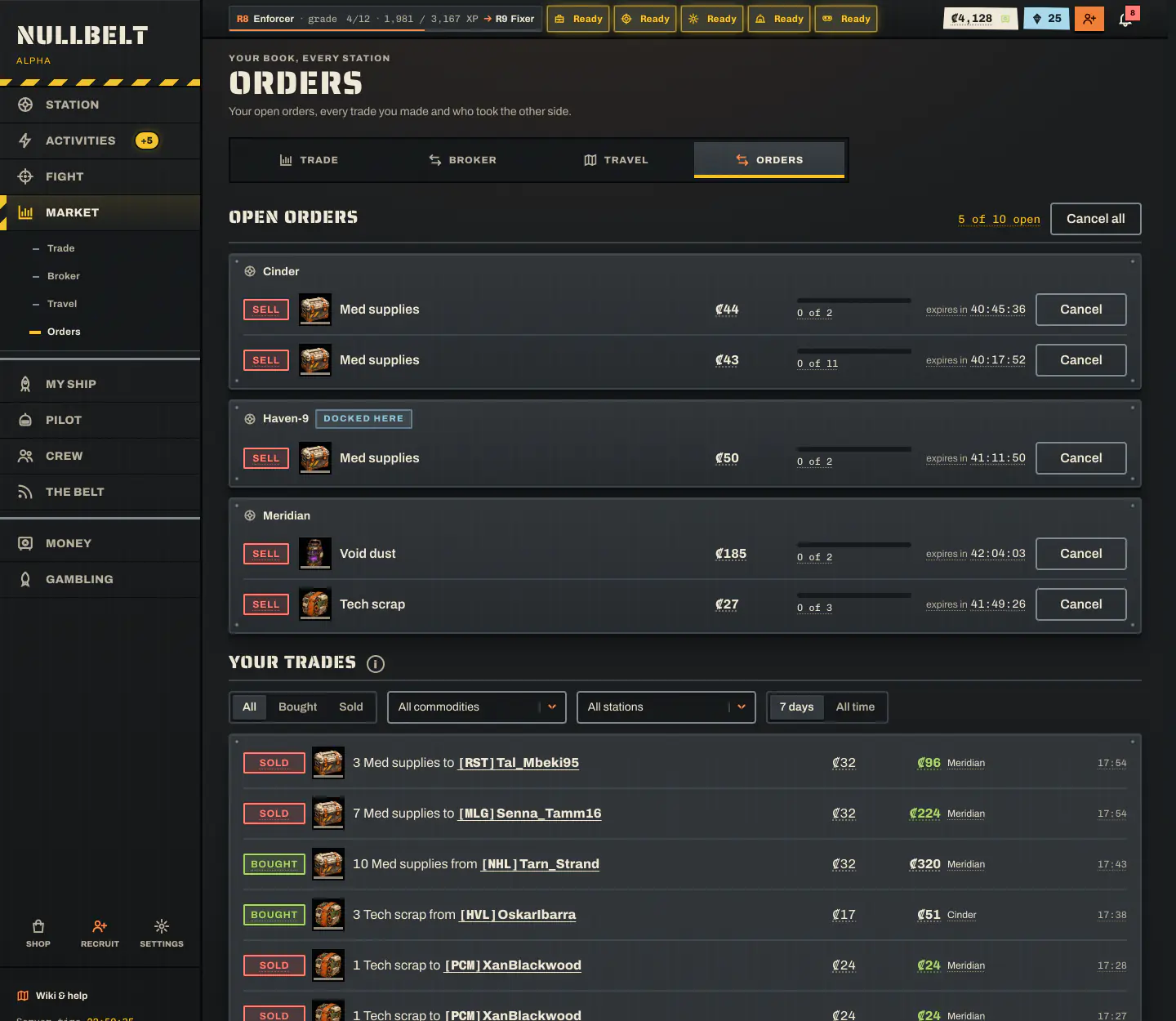
Market → Orders is your personal trading desk:
- Open orders on every station. Cancel one, or use Cancel all. Cancelling works even in transit or in the brig. The escrow comes back the usual way.
- Your trades, newest first. Each fill shows the commodity, quantity, price, gross, fee, net and whether you were maker or taker, plus the counterparty: the pilot as they were at the fill (name and crew tag), or the Station stall.
- Results per commodity: volume, average buy and sell price, fees paid and realised profit, matched first in, first out.
Only the two pilots on a fill see each other's names. Public price history stays anonymous.
Fill notices#
When someone fills one of your resting orders, you get a notification: the bell, a live toast and a badge on the Orders tab. You can also turn on a system notification in Settings; it only fires while the game is open, in a tab or the installed app, because Nullbelt has no push notifications. Fills of the same order within 60 seconds of the first are folded into one notice with totals, and it says when the order is fully filled. Tapping the notice opens Orders with that order's fills pinned at the top.
Note
Credits from a resting sale are paid on your next read or action in the game. Opening the app is enough.
Worked example: placing a bid and getting filled#
You're docked at Meridian and want 20 water ice for a run. The stall's ask looks high, so you place a limit buy at your price instead.
- Open Market → Trade, tap Water ice, choose Buy and At my price.
- Say the best player bid is ₡9 and the best ask is the stall's ₡11. You set 20 units at ₡10, which puts you at the top of the bids.
- Nothing sells at ₡10 or below right now, so the whole order rests. The Exchange holds 20 × ₡10 = ₡200 from your credits on hand. You pay no fee, because you're the maker.
- An hour later, another pilot taps Sell now for 12 water ice. Your bid beats the stall's, so 12 units fill at ₡10, your price. The seller pays the taker fee (2% of ₡120) and you pay none.
- You get a fill notice: "Bought 12 of your 20 Water ice at ₡10 at Meridian from …". The 12 units go to your hold if you're docked there with room, or to your Meridian locker if not.
- The other 8 units keep resting. They either fill later, come back as credits if you cancel, or come back when the order expires after 48 hours.
Tip
The trade sheet summary tells you before you confirm what fills now and what rests. For a sell of 20 at ₡14, it might read "Fills 12 now at ₡14–₡15" and "8 rest on the book at ₡14", along with the fee and the total.
When you die with orders open#
If you're flatlined, your open orders are cancelled:
- Credits held in buy escrow, and sale credits not yet paid out, count as credits on hand, so the killer takes them.
- Goods in escrow or owed to you go to your lockers. Those are lost with the pilot on a final death, just like cargo, and come back if Clone Insurance revives you.
Next: see what each good is for in Commodities, or learn how to profit in the trading guide.
Frequently asked questions#
Are prices on the Nullbelt Exchange random?
No. Every price is set by a pilot's order or by the station stall, which quotes around a reference price built from real player trades. Nothing on the Exchange is random.
Who pays the trading fee?
Only the taker, meaning the order that crossed the book and filled right away. An order resting on the book pays nothing when someone fills it.
How long does an order stay on the book?
A limit order rests until it fills, you cancel it, or it reaches its expiry age. Then the escrow comes back to you. Market orders never rest.
Why was my buy order refused with a locker error?
What a limit buy fills now beyond your hold's room, plus everything that would rest, must fit in your storage locker at that station. Resting buys reserve that locker space, so goods are never lost when they fill later.
Can I trade on the Exchange without verifying my account?
You can buy and sell now against the station stall only, up to the room in your hold. Placing orders that can fill against other pilots needs a verified email.