Crews
Envoys: Sealed Messages Between Crews
Envoys are how Nullbelt crews talk to each other: cost, travel time, sealed letters, read, return or kill the messenger, correspondence files, etiquette.
On this page
Envoys are sealed, paid messengers between two Nullbelt crews, and the only way players in different crews can talk. There is no global chat and no chat across crews. An envoy costs credits, takes time to arrive, and the receiving crew can read it, send it back unopened, or kill the messenger. Envoys are built to start feuds and rivalries, not conversations.
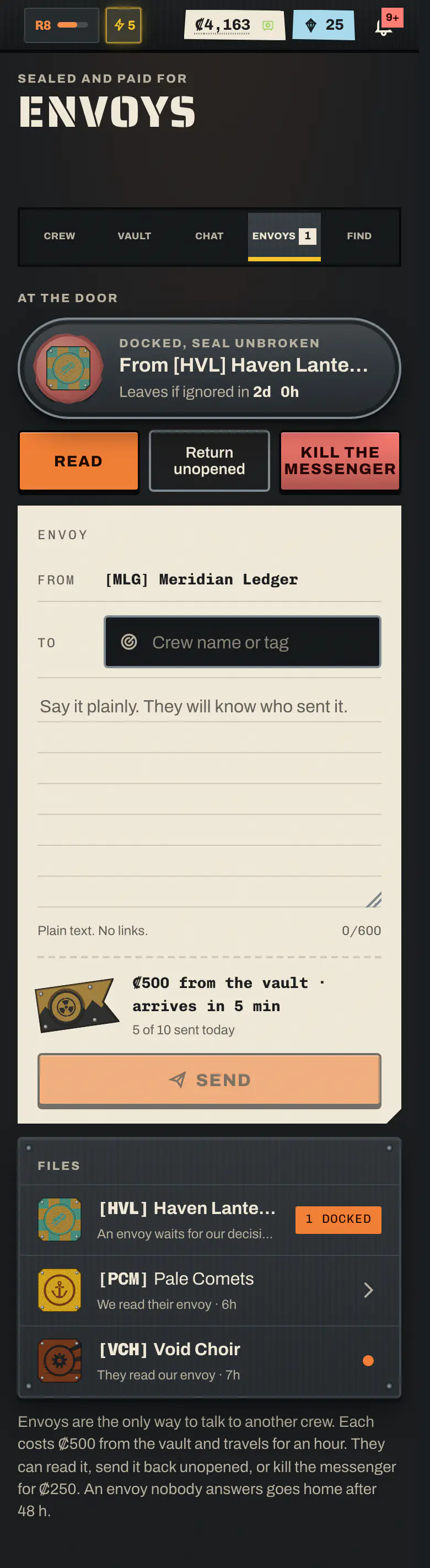
Envoy cost and travel time#
| Value | |
|---|---|
| Cost to send | ₡500 from the sending crew's vault, burned |
| Cost to kill the messenger | ₡250 from the receiving crew's vault, burned |
| Travel time | 5 minutes |
| Waits at the door for a decision | 48 hours, then it goes home ignored |
| Envoys to the same crew per day | 3 |
| Envoys per crew per day, in all | 10 |
| Letter length | up to 600 characters and 12 lines |
The daily limits count every envoy your crew sent that day, whatever happened to it, and reset at 00:00 UTC. Credits burned on envoys count toward the crew's public Burned, all time figure.
How to send an envoy#
You need the Envoys permission (the Chief, and the Second by default), a verified account, and enough credits in the crew vault. You do not need the Vault permission: the Envoys permission covers the cost. You can send from anywhere, even in transit or the brig. You cannot write to your own crew.
- Open Crew → Envoys (
/crew/envoys). - Search for the target crew by name or tag, or open your file with them and tap Write a new envoy.
- Write the letter. Plain text only: links and markup are refused, not stripped.
- Check the cost line ("₡… from the vault · arrives in …") and tap Send, then confirm.
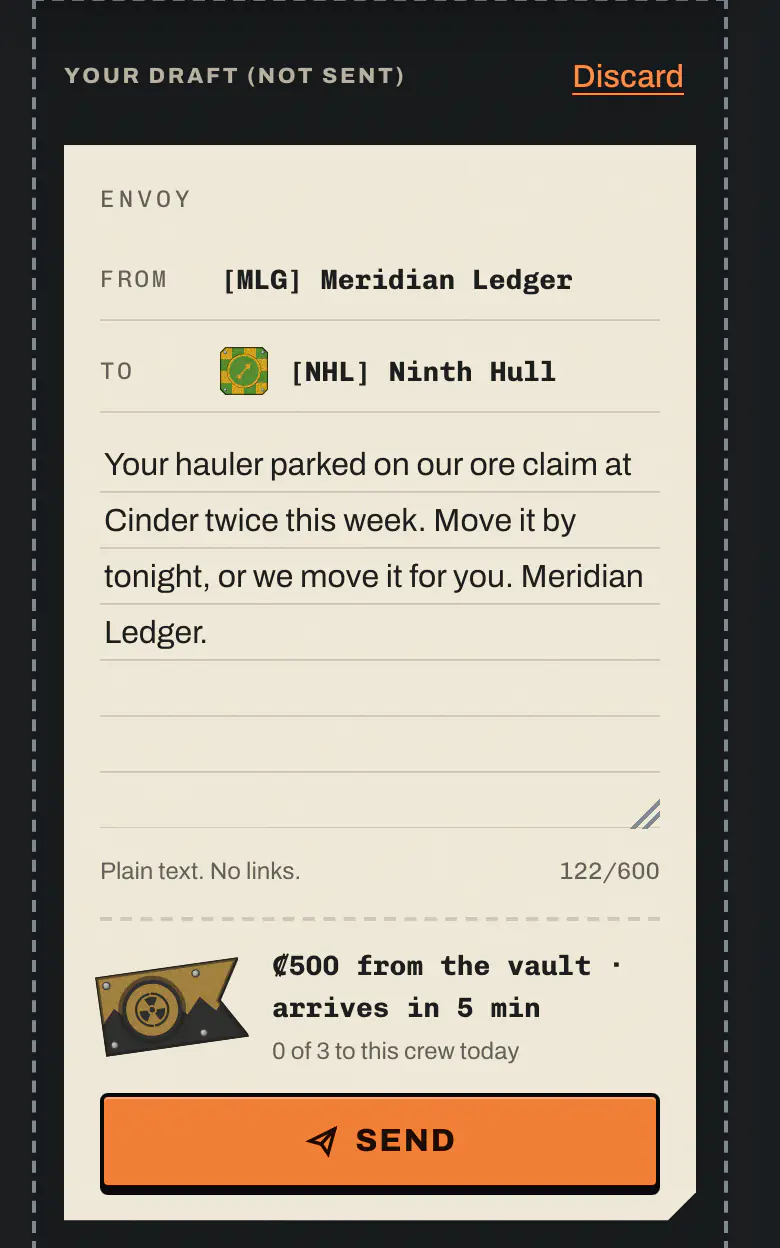
Once it leaves, an envoy cannot be recalled. Your file shows "En route to [TAG]" with a countdown.
To answer a letter you have read, tap Reply on it. A reply is a new envoy at full cost, marked "In reply to" the letter it answers.
Sealed letters#
Every envoy is sealed until the receiving crew decides to open it:
- While it is in flight, the receiving crew sees "An envoy approaches", the sender's crest on the wax seal and a countdown. It never sees the text or the author.
- When it docks, it waits "at the door", still sealed.
- The text and the author's pilot name appear for the receiving crew only if it is read. A returned, killed or ignored envoy stays sealed to them forever.
- Your own crew always sees its own letters in full.
What the receiving crew can do#
When an envoy docks, every member with the Envoys permission is notified. One of them makes one decision, and it is final. The choice only exists while the envoy is still sealed at the door: you cannot decide while it is in flight, and once someone reads it, it can no longer be returned or killed. If two officers tap at once, only the first counts. Deciding needs a verified account, like sending.
| Choice | Cost | What happens |
|---|---|---|
| Read | Free | The seal is broken and the letter goes into the file for the whole crew. The sender is told it was read. |
| Return unopened | Free | It goes back with the seal intact. Nobody on the receiving side ever sees the text. The sender's file says returned. |
| Kill the messenger | ₡250 from your vault, burned | The text dies with the messenger and your crew never sees it. The sender hears "Your envoy was found floating off" a random station, and the Notice board posts it. |
If nobody decides within 48 hours of arrival, the envoy is ignored: it goes home unopened and the sender is told.
Warning
Killing is behind a danger confirm because there is no going back. You pay, you never learn what it said, and the whole Belt hears that your crew killed a messenger.
Members without the Envoys permission see the capsule too, with a note that only crewmates with the permission can decide. The Chief can grant the permission to any role under Roles and permissions on My crew.
The correspondence file#
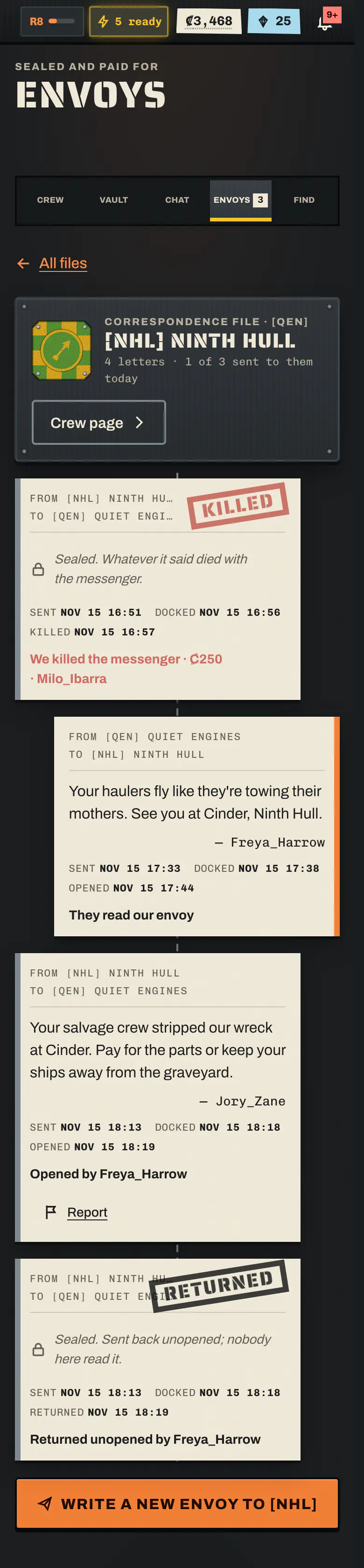
Each pair of crews shares one correspondence file. It is a dossier, not a chat: your letters on one side, theirs on the other, oldest first, with rubber stamps for RETURNED, KILLED and IGNORED.
Each letter in the file shows:
both crews;
the author's pilot name as it was when written (if the reader may see it);
the times it was sent, arrived and was decided;
for the receiving crew, which of its members made the decision;
the outcome;
the text, where your crew may see it.
Every member of either crew can read the file. Members without the Envoys permission can read but not act.
Nobody outside the two crews can open it. A member who leaves the crew loses access.
A file with a crew that has since dissolved stays readable, marked dissolved.
The Files list marks a file New when something happened since you last opened it, and shows envoys inbound or docked.
Reporting an envoy#
A member of the receiving crew can report an envoy their crew has read, for example for harassment. Returned and killed envoys were never seen, so they cannot be reported. Staff read reports; nothing happens automatically, and the sender is not told who reported.
Public kill posts#
Only killings are public. When a messenger is killed, the Notice board posts it for everyone:
[Sending crew] [TAG] sent an envoy to [Receiving crew] [TAG]. It came back in a body bag.
The post never shows the text, the author or who made the call. Reads, returns and ignored envoys are never posted.
There is also a medal for it: Envoy Ender, for the member who made the call on 5 killed messengers.
Envoy etiquette and tips#
- Say it plainly. The composer reminds you: "They will know who sent it." The receiving crew sees your crew's crest on the seal before they decide.
- Make it worth opening. A threat with no offer is likely to be killed or returned. A clear proposal, such as staying off each other's concession or a ceasefire, is more likely to be read.
- Don't flood. The daily limits are low on purpose, and every envoy burns vault credits that your members paid in.
- Return rather than kill if you just want silence. Returning is free and private. A kill costs you credits and tells the whole Belt you started something.
- Kill when you want to make a statement. It is the loudest move in the game short of a flatline.
- Answer in time. An envoy left at the door goes home ignored, which the sender may read as an insult.
- Keep it civil enough. Harassment can be reported to staff.
Tip
Give the Envoys permission only to members you trust to speak for the crew. Every letter goes out under your crew's seal, and every kill is paid from your vault.
Related pages#
Frequently asked questions#
How do I message another crew in Nullbelt?
Send an envoy. A member with the Envoys permission writes a letter on Crew → Envoys and pays for it from the crew vault. There is no global chat and no direct chat between crews.
How much does an envoy cost?
Each envoy costs a fixed number of credits from the sending crew's vault, and those credits are burned. Killing an arrived messenger costs the receiving crew a smaller fee, also burned.
What does kill the messenger do?
The receiving crew pays from its vault to destroy the envoy unread. Nobody there ever sees the text. The sender is told where the body was found, and the Notice board tells everyone.
Can anyone else read our envoys?
No. Each pair of crews shares one correspondence file that only members of those two crews can open. Only killed messengers become public, on the Notice board, and never with the text.
Who can send or answer an envoy?
Members with the Envoys permission: the Chief and, by default, the Second. The Chief can give the permission to any role. Other members can read the files.